PHP-TUI 18/03/2026
BisouLand is an eXtreme Legacy (2005 LAMP) app, an idle browser game where players take each other's Love Points by blowing kisses across clouds.
In the previous article, we built Qalin: BisouLand's Test Control Interface, a dedicated Symfony app that lets anyone on the team reach any game state on demand, without touching production code.
Qalin already has three interfaces: CLI, API, and a Web UI.
After using it for a bit, I realised to my utter dismay that I somehow preferred using the Web UI, instead of the CLI one as I'd expect 🙀. I live in the terminal, using a Web UI or GUI is unacceptable, so let's fix that by...
Introducing a TUI (Terminal User Interface). In today's article, we'll build one with PHP-TUI.
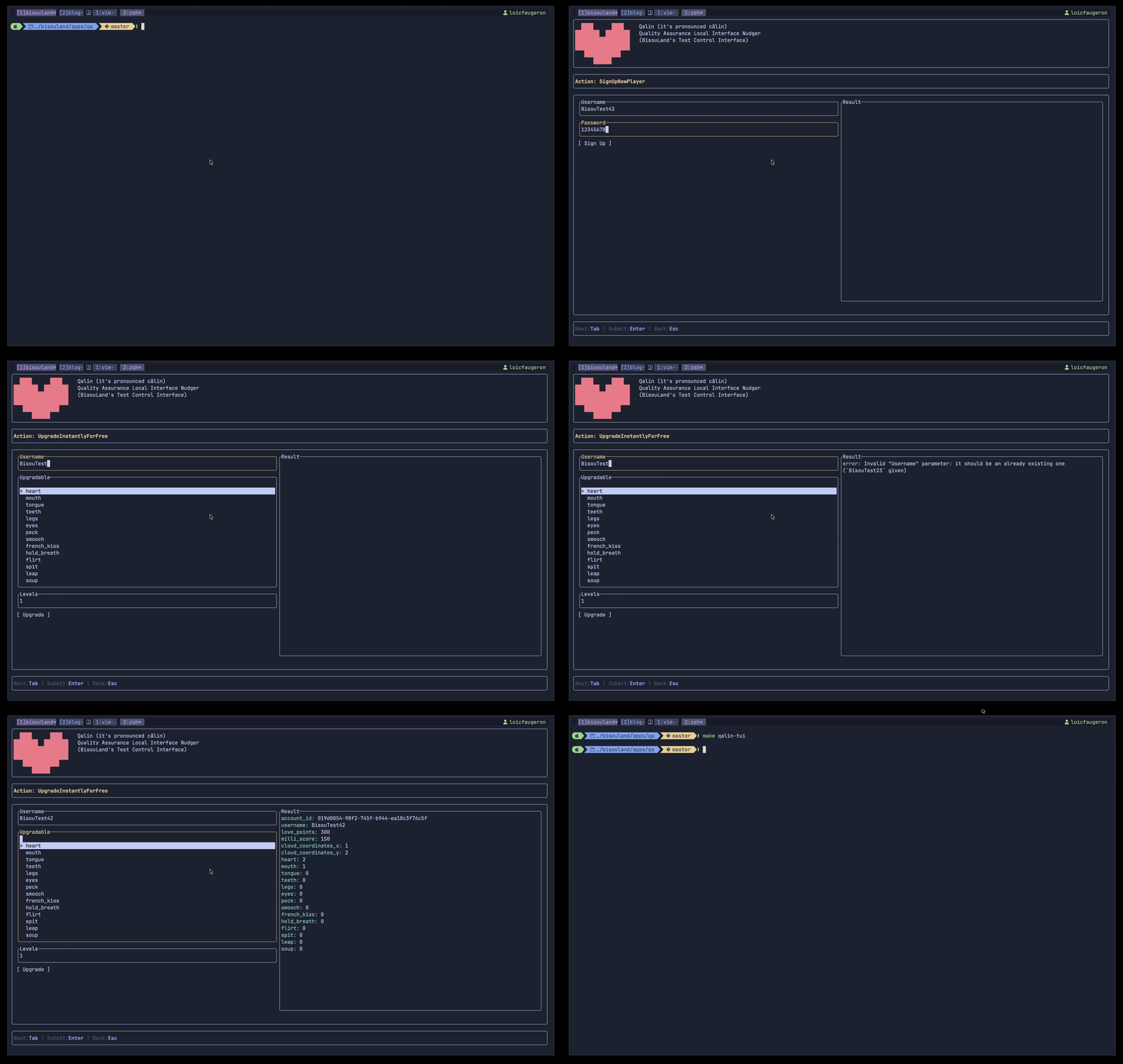
Did you notice the animated banner when switching to new screen or submitting the forms? Nice!
What is PHP-TUI?
PHP-TUI is a PHP port of Ratatui, the popular Rust TUI library.
It gives you a retained-mode widget system, a layout engine based on constraints, and a terminal backend: all the building blocks to draw full-screen interactive applications directly in your terminal.
The core loop is straightforward:
- Poll the terminal for keyboard events
- Update application state based on those events
- Build a widget tree that reflects current state
- Render it to the screen
No browser, no HTTP server, no JavaScript framework. Just your terminal, a render loop, and widgets.
PHP-TUI is powerful precisely because it stays out of your way: it doesn't come with any opinionated defaults or conventions about how to structure an application. It gives you widgets, a layout engine, and a terminal backend, and leaves everything else to you.
But that means it can be quite daunting to build your own application with it, especially since there are (at the time of writing) not a lot of resources about it.
Most of what follows, the Screen interface, the Action navigation model,
the Component abstraction, the Form system, the custom widgets, are things I designed myself,
loosely inspired by my partial understanding of how Ratatui applications are structured.
Take them as one possible approach, not as the official way to use PHP-TUI.
Let's walk through it.
The Main Loop
QalinTui is the entry point. It sets up the terminal, registers widget renderers,
and runs the event/render loop:
public function run(): void
{
    $terminal = Terminal::new();
    $backend = PhpTermBackend::new($terminal);
    $display = DisplayBuilder::default($backend)
        ->addWidgetRenderer(new LayoutWidgetRenderer())
        ->addWidgetRenderer(new BannerWidgetRenderer())
        ->addWidgetRenderer(new FormWidgetRenderer())
        ->addWidgetRenderer(new KeyHintsWidgetRenderer())
        // ... more custom renderers
        ->fullscreen()
        ->build()
    ;

    try {
        $terminal->execute(Actions::cursorHide());
        $terminal->execute(Actions::alternateScreenEnable());
        $terminal->enableRawMode();

        while (true) {
            // Drain all queued events before redrawing
            while ($event = $terminal->events()->next()) {
                $action = $this->handle($event);
                if ($action instanceof Quit) {
                    return;
                }
            }

            $display->draw($this->activeScreen->build());
            usleep(50_000); // 50 ms
        }
    } finally {
        $terminal->disableRawMode();
        $terminal->execute(Actions::alternateScreenDisable());
        $terminal->execute(Actions::cursorShow());
    }
}
Three terminal setup calls worth knowing:
alternateScreenEnable()switches to a blank buffer, so closing the TUI restores the terminal exactly as it was beforeenableRawMode()disables the default echo and buffering behaviours, so keypresses go directly to the application instead of being processed by the shellcursorHide()removes the blinking cursor from the TUI surface
The finally block ensures all three are reversed on exit, whether the app quits normally
or throws.
The inner loop drains all queued events before each redraw. This avoids redundant renders when multiple events arrive within the same 50 ms window.
🐘 PHP-TUI:
DisplayBuilder::default()is the entry point for constructing a display.addWidgetRenderer()registers custom renderers alongside the built-in ones.fullscreen()sizes the surface to the terminal dimensions.build()returns the display ready for use.
The Screen Interface
The application is structured around screens.
Each screen is a full-page view with three responsibilities:
interface Screen
{
    // Unique display name (shown in menus, titles, etc.)
    public function name(): string;

    // Renders current state as a Widget tree for this frame
    public function build(): Widget;

    // Processes an input event and signals what should happen next
    public function handle(Event $event): Action;
}
handle() returns one of three Action types:
Stay: the event was handled internally, stay on this screenNavigate(ScreenClass::class): transition to another screenQuit: exit the TUI
QalinTui owns all registered screens and a pointer to the active one.
When handle() returns Navigate, it updates the active screen pointer and returns
Stay to the loop:
public function handle(Event $event): Action
{
    $action = $this->activeScreen->handle($event);

    if ($action instanceof Navigate) {
        $this->activeScreen = $this->screens[$action->screen] ?? $this->activeScreen;

        return new Stay();
    }

    return $action;
}
Screens are registered via Symfony's #[AutowireIterator] by DI tag, so adding a new
screen is a matter of implementing Screen and tagging it, no wiring by hand.
The Home Screen
HomeScreen is the entry point. It shows a tab-split choice input
of available actions and scenarios.
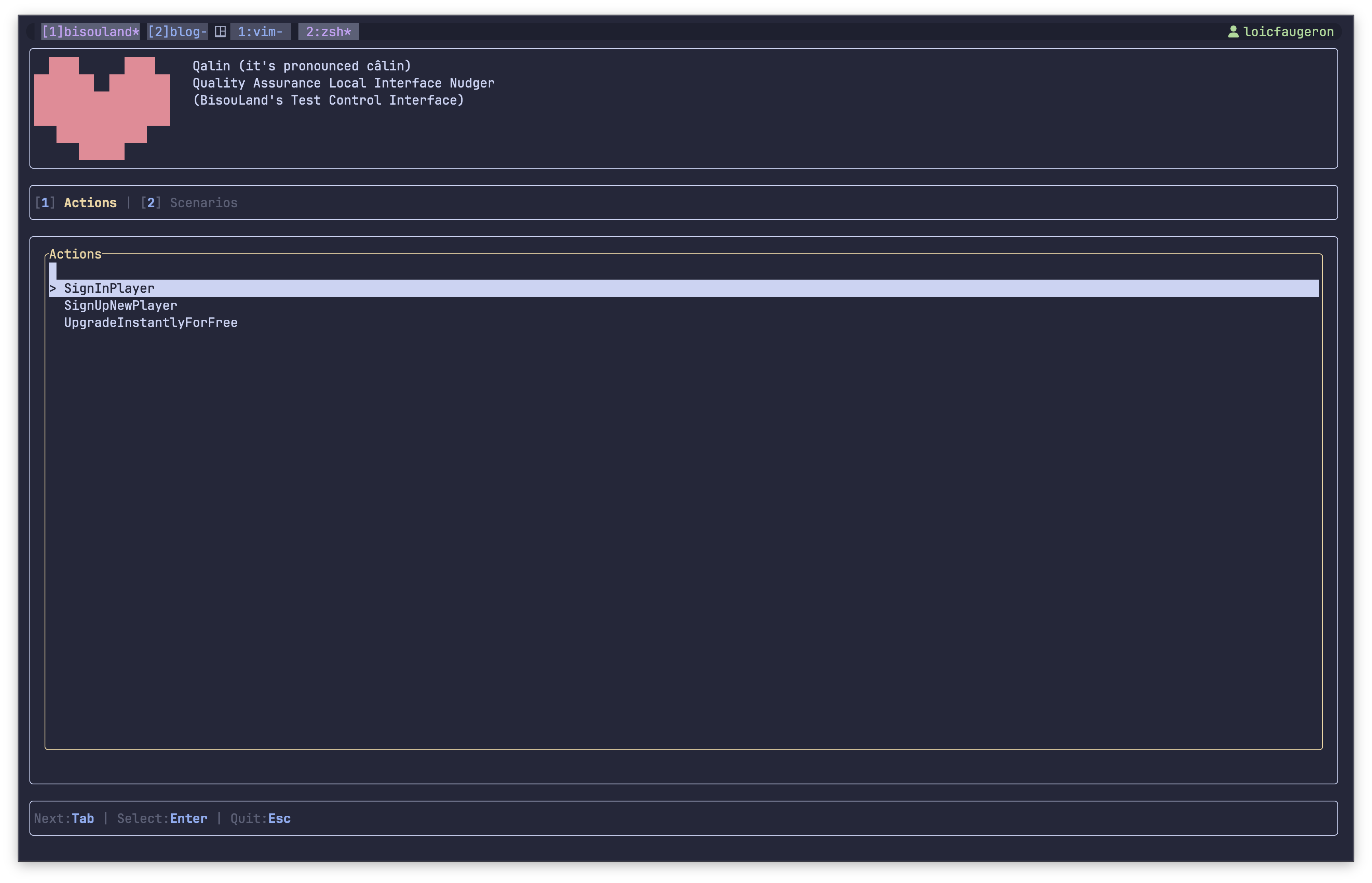
The choice input combines a fuzzy-find filter and a navigable list in a single component,
ChoiceFieldComponent. The screen passes it the screen names for the active tab and
delegates all filtering and navigation to it.
build() is straightforward:
public function build(): Widget
{
    return LayoutWidget::from(
        $this->qalinAnimatedBanner->widget(),
        $this->tabs->build(),      // hotkey tab bar: "1 Actions / 2 Scenarios"
        $this->choiceInput->build(), // fuzzy-find filter + navigable list
        KeyHintsWidget::from(['Next' => 'Tab', 'Select' => 'Enter', 'Quit' => 'Esc']),
    );
}
ChoiceFieldComponent::build() returns a single widget that renders both the filter
input and the list, so the screen body is just $this->choiceInput->build(): no
manual GridWidget, no ListWidget, no cursor tracking.
The handle() method uses PHP's match to dispatch on event type and key code:
public function handle(Event $event): Action
{
    return match (true) {
        $event instanceof CodedKeyEvent => match ($event->code) {
            KeyCode::Esc => new Quit(),
            KeyCode::Tab, KeyCode::Down => $this->handleChoiceInput(CodedKeyEvent::new(KeyCode::Down)),
            KeyCode::BackTab, KeyCode::Up => $this->handleChoiceInput(CodedKeyEvent::new(KeyCode::Up)),
            KeyCode::Enter => $this->selectCurrentScreen(),
            default => $this->handleChoiceInput($event),
        },
        $event instanceof CharKeyEvent => match ($this->tabs->handle($event)) {
            ComponentState::Changed => $this->resetChoiceInput(),
            ComponentState::Handled => new Stay(),
            ComponentState::Ignored, ComponentState::Submitted => $this->handleChoiceInput($event),
        },
        default => new Stay(),
    };
}
Tab hotkeys (1 for Actions, 2 for Scenarios) are tried first for every character
event. If the character is not a hotkey, it is forwarded to ChoiceFieldComponent,
which appends it to the filter. Switching tabs resets the choice input for the new tab's
screen list.
Action Screens
Each Qalin action has its own screen. They all follow the same pattern: a form on the left, the API response on the right.
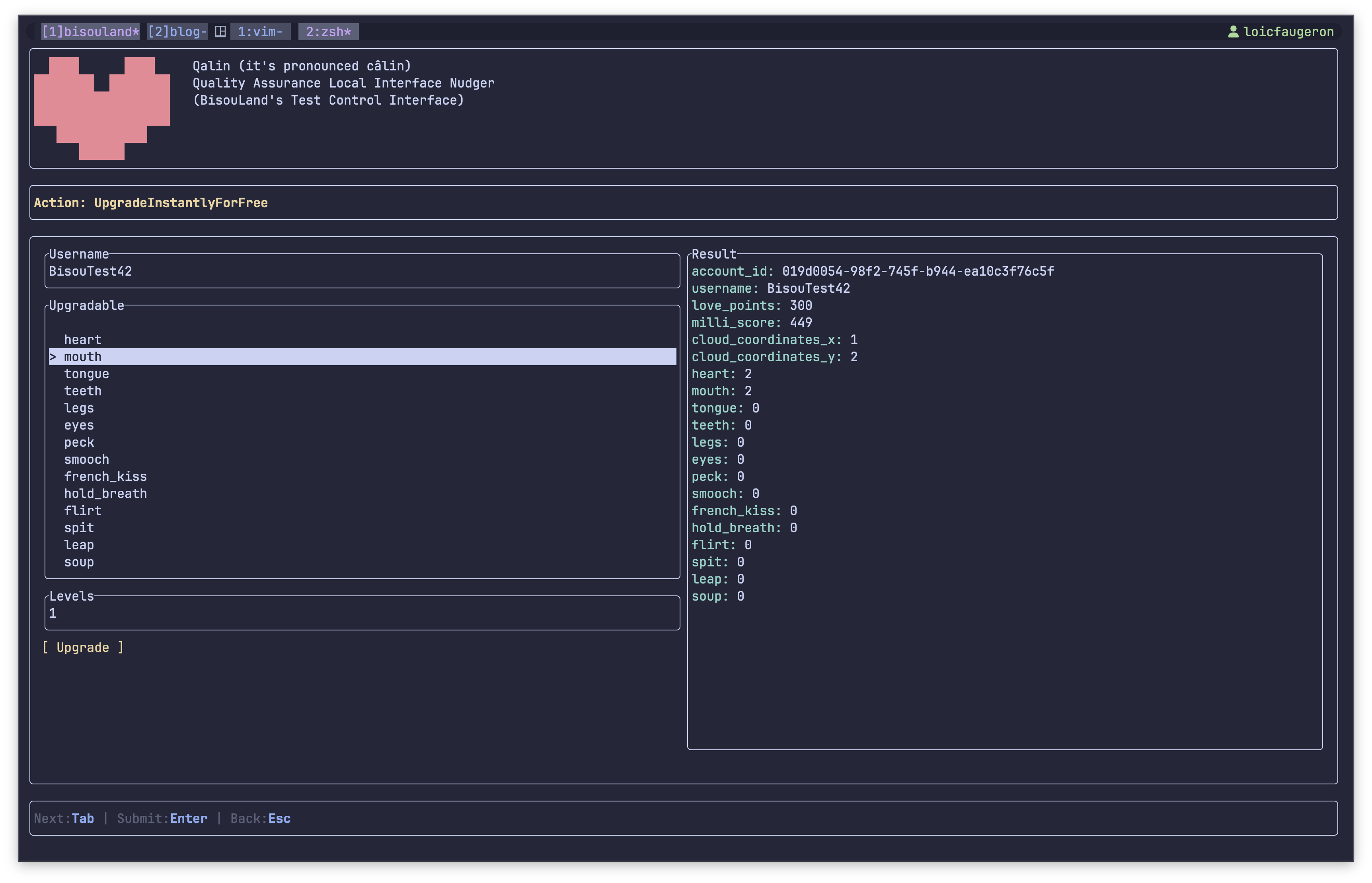
Here is UpgradeInstantlyForFreeScreen:
public function __construct(
    private readonly HttpClientInterface $qalinHttpClient,
    private readonly QalinAnimatedBanner $qalinAnimatedBanner,
) {
    $this->form = FormComponent::fromFields(
        InputFieldComponent::fromLabel('Username'),
        ChoiceFieldComponent::fromLabelAndChoices('Upgradable', array_map(
            static fn (Upgradable $u): string => $u->value,
            Upgradable::cases(),
        )),
        InputFieldComponent::fromLabel('Levels')->withValue('1'),
        SubmitFieldComponent::fromLabel('Upgrade'),
    );
}

public function build(): Widget
{
    return LayoutWidget::from(
        $this->qalinAnimatedBanner->widget(),
        ConstrainedWidget::wrap(
            ParagraphWidget::fromLines(Line::fromSpans(
                Span::styled('Action: UpgradeInstantlyForFree', Style::default()
                    ->fg(AnsiColor::Yellow)
                    ->addModifier(Modifier::BOLD)),
            )),
            Constraint::length(3),
        ),
        GridWidget::default()
            ->direction(Direction::Horizontal)
            ->constraints(
                Constraint::percentage(50),
                Constraint::percentage(50),
            )
            ->widgets(
                $this->form->build(),
                BlockWidget::default()
                    ->borders(Borders::ALL)
                    ->borderType(BorderType::Rounded)
                    ->titles(Title::fromString('Result'))
                    ->widget(KeyValueWidget::fromRows($this->result ?? [])),
            ),
        KeyHintsWidget::from(['Next' => 'Tab', 'Submit' => 'Enter', 'Back' => 'Esc']),
    );
}

public function handle(Event $event): Action
{
    if ($event instanceof CodedKeyEvent && KeyCode::Esc === $event->code) {
        $this->qalinAnimatedBanner->animate();

        return new Navigate(HomeScreen::class);
    }

    if (ComponentState::Submitted !== $this->form->handle($event)) {
        return new Stay();
    }

    $this->qalinAnimatedBanner->animate();

    $response = $this->qalinHttpClient->request('POST', 'api/v1/actions/upgrade-instantly-for-free', [
        'json' => [
            'username'   => $this->form->getValues()['Username'],
            'upgradable' => $this->form->getValues()['Upgradable'],
            'levels'     => (int) $this->form->getValues()['Levels'],
        ],
    ]);
    $this->result = $response->toArray(false);

    return new Stay();
}
The FormComponent manages tab-cycling between fields and signals ComponentState::Submitted
when the submit button is pressed. The screen delegates all form events to it and only
reacts to the Submitted state: it does not need to know which field is focused or
how the cursor moves.
Custom Widgets
PHP-TUI ships a set of built-in widgets (Paragraph, Grid, Block, List, etc.). For anything that needs different composition or reuse, you create a custom widget.
A custom widget is two classes:
- A data class (the widget itself): holds parameters, has no rendering logic
- A renderer: converts the widget data into built-in widget calls
HotkeyTabsWidget renders a tab bar like [1] Actions | [2] Scenarios.
The data class holds the tabs map, the focused hotkey, and three style properties:
final readonly class HotkeyTabsWidget implements Widget, Constrained
{
    /** @param non-empty-array<array-key, string> $hotkeyTabs hotkey => label */
    private function __construct(
        public array $hotkeyTabs,
        public string $focusedHotkey,
        public Style $hotkeyStyle,
        public Style $focusedLabelStyle,
        public Style $unfocusedLabelsStyle,
    ) {
    }

    /** @param array<array-key, string> $tabs hotkey => label */
    public static function fromTabs(array $tabs): self
    {
        if ([] === $tabs) {
            throw ValidationFailedException::make(
                'Invalid "HotkeyTabsWidget" parameter: tabs should not be empty (`[]` given)',
            );
        }

        foreach (array_keys($tabs) as $hotkey) {
            if (1 !== mb_strlen((string) $hotkey)) {
                throw ValidationFailedException::make(
                    "Invalid \"HotkeyTabsWidget\" parameter: tab hotkey should be a single character (`{$hotkey}` given)",
                );
            }
        }

        return new self(
            $tabs,
            (string) array_key_first($tabs),
            Style::default()->fg(AnsiColor::Blue)->addModifier(Modifier::BOLD),
            Style::default()->fg(AnsiColor::Yellow)->addModifier(Modifier::BOLD),
            Style::default()->fg(AnsiColor::DarkGray),
        );
    }

    public function focus(string $hotkey): self
    {
        if (!\array_key_exists($hotkey, $this->hotkeyTabs)) {
            throw ValidationFailedException::make(
                "Invalid \"HotkeyTabsWidget\" parameter: focusedHotkey should match an existing tab hotkey (`{$hotkey}` given)",
            );
        }

        return new self(
            $this->hotkeyTabs,
            $hotkey,
            $this->hotkeyStyle,
            $this->focusedLabelStyle,
            $this->unfocusedLabelsStyle,
        );
    }

    public function constraint(): LengthConstraint
    {
        return Constraint::length(3);
    }

    // hotkeyStyle(), focusedLabelStyle(), unfocusedLabelsStyle() withers omitted for brevity
}
The widget is immutable: focus() returns a new instance rather than mutating state.
constraint() is part of the Constrained interface, which lets the layout system
ask the widget how much space it needs (3 rows: 1 content + 2 border).
The renderer builds the [1] Actions | [2] Scenarios line from Span elements,
applying the focused or unfocused label style depending on which hotkey is active:
final class HotkeyTabsWidgetRenderer implements WidgetRenderer
{
    public function render(
        WidgetRenderer $renderer,
        Widget $widget,
        Buffer $buffer,
        Area $area,
    ): void {
        if (!$widget instanceof HotkeyTabsWidget) {
            return;
        }

        $spans = [];
        $isFirstTab = true;
        foreach ($widget->hotkeyTabs as $key => $label) {
            $hotkey = (string) $key;
            $label  = (string) $label;

            if (!$isFirstTab) {
                $spans[] = Span::styled(' | ', $widget->unfocusedLabelsStyle);
            }

            $isFirstTab = false;

            $spans[] = Span::styled('[', $widget->unfocusedLabelsStyle);
            $spans[] = Span::styled($hotkey, $widget->hotkeyStyle);
            $spans[] = Span::styled('' !== $label ? '] ' : ']', $widget->unfocusedLabelsStyle);
            $spans[] = Span::styled(
                $label,
                $hotkey === $widget->focusedHotkey
                    ? $widget->focusedLabelStyle
                    : $widget->unfocusedLabelsStyle,
            );
        }

        $renderer->render(
            $renderer,
            ParagraphWidget::fromLines(Line::fromSpans(...$spans)),
            $buffer,
            $area,
        );
    }
}
The renderer receives the Area (width and height of the allocated space) and the
Buffer (the mutable character grid for this frame). It does not write to the buffer
directly: it delegates to a built-in widget via $renderer->render().
That is the common pattern: assemble standard widgets from the widget's data, then
pass rendering back to the framework.
🐘 PHP-TUI: register custom renderers with
DisplayBuilder::addWidgetRenderer(). Renderers are checked in order; the first one that recognises the widget class wins. TheWidgetRenderer $rendererparameter passed torender()is the full chain, so delegating to built-in widgets is just$renderer->render($renderer, $childWidget, $buffer, $area).
Components
A component wraps a widget with mutable state and event handling. Where a widget is pure data built fresh each frame, a component lives across frames and tracks what has changed.
HotkeyTabsComponent wraps HotkeyTabsWidget and adds focus state and event handling.
It is generic over HotkeyTab, an interface with two methods:
interface HotkeyTab
{
    public function key(): string;   // single character, e.g. '1'
    public function label(): string; // display name, e.g. 'Actions'
}
Any backed enum implementing HotkeyTab can be used as a tab set.
HomeTab is the one used by HomeScreen:
enum HomeTab: string implements HotkeyTab
{
    case Actions   = 'Actions';
    case Scenarios = 'Scenarios';

    public function key(): string
    {
        return match ($this) {
            self::Actions   => '1',
            self::Scenarios => '2',
        };
    }

    public function label(): string { return $this->value; }
}
The component itself:
/** @template TTab of HotkeyTab */
final class HotkeyTabsComponent implements Component
{
    private int $focusedIndex = 0;

    /** @param non-empty-list<TTab> $tabs */
    private function __construct(private readonly array $tabs) {}

    /** @return self<TTab> */
    public static function fromTabs(array $tabs): self
    {
        return new self($tabs);
    }

    public function handle(Event $event): ComponentState
    {
        if (!$event instanceof CharKeyEvent) {
            return ComponentState::Ignored;
        }

        foreach ($this->tabs as $index => $tab) {
            if ($event->char === $tab->key()) {
                if ($index === $this->focusedIndex) {
                    return ComponentState::Handled;
                }

                $this->focusedIndex = $index;

                return ComponentState::Changed;
            }
        }

        return ComponentState::Ignored;
    }

    public function build(): HotkeyTabsWidget
    {
        $tabs = [];
        foreach ($this->tabs as $tab) {
            $tabs[$tab->key()] = $tab->label();
        }

        return HotkeyTabsWidget::fromTabs($tabs)
            ->focus($this->tabs[$this->focusedIndex]->key());
    }

    /** @return TTab */
    public function isFocused(): mixed
    {
        return $this->tabs[$this->focusedIndex];
    }
}
handle() returns ComponentState::Changed when the focused tab changes, Handled
when the same tab's hotkey is pressed again, and Ignored for anything else.
The screen uses that distinction to decide whether to reset dependent state (e.g. the
choice input) or simply stay put.
build() snapshots the current focus into a fresh HotkeyTabsWidget each frame.
The widget has no memory of previous frames; the component does.
Animations
The Qalin banner is animated. When the user navigates between screens, it plays a short animation: either a Beat (the logo contracts and shifts to magenta) or Sparkles (sparkle characters appear on the logo).
Both implement the same Animation interface:
interface Animation
{
    public function animate(): void;
    public function logo(): array;
    public function logoStyle(): Style;
}
Beat is time-based. It stores the moment animate() was called, then
isBeating() derives the current state from elapsed time:
final class Beat implements Animation
{
    private const BEAT_ON_SECONDS  = 0.15;
    private const BEAT_OFF_SECONDS = 0.1;
    private const BEAT_COUNT       = 2;

    private ?float $beatStartedAt = null;

    public function animate(): void
    {
        $this->beatStartedAt = $this->now();
    }

    public function logo(): array
    {
        return $this->isBeating() ? self::CONTRACTED_LOGO : QalinBanner::LOGO;
    }

    public function logoStyle(): Style
    {
        return $this->isBeating()
            ? Style::default()->fg(AnsiColor::Magenta)
            : Style::default()->fg(AnsiColor::Red);
    }

    private function isBeating(): bool
    {
        if (null === $this->beatStartedAt) {
            return false;
        }

        $elapsed = $this->now() - $this->beatStartedAt;
        $cycleSeconds = self::BEAT_ON_SECONDS + self::BEAT_OFF_SECONDS;
        $totalSeconds = self::BEAT_COUNT * $cycleSeconds;

        if ($elapsed >= $totalSeconds) {
            $this->beatStartedAt = null;

            return false;
        }

        return fmod($elapsed, $cycleSeconds) < self::BEAT_ON_SECONDS;
    }

    private function now(): float
    {
        return (float) $this->clock->now()->format('U.u');
    }
}
The animation has no state machine, no scheduler, no timer callback.
logo() and logoStyle() are called every frame (every 50 ms);
they read the clock, compute where we are in the animation, and return the right data.
When the animation is over, beatStartedAt is reset to null.
QalinAnimatedBanner wraps the animations and exposes a single widget() method
for screens to use:
final class QalinAnimatedBanner
{
    public function animate(): void
    {
        $this->currentAnimation = $this->pickRandomAnimation();
        $this->currentAnimation->animate();
    }

    public function widget(): BannerWidget
    {
        $logo      = $this->currentAnimation?->logo()      ?? QalinBanner::LOGO;
        $logoStyle = $this->currentAnimation?->logoStyle() ?? Style::default()->fg(AnsiColor::Red);

        return QalinBanner::widgetWithLogo($logo, $logoStyle);
    }
}
Screens call $this->qalinAnimatedBanner->animate() on navigation events (entering and
leaving a screen), then let widget() return whatever frame the animation is currently on.
🎶 Symfony Clock:
ClockInterfacefromsymfony/clocklets the animation read the current time without coupling totime()ormicrotime(). In tests, swap in aMockClockand control time explicitly. For a feature as simple as a cosmetic animation the test value is low, but the approach scales cleanly to anything time-sensitive.
Testing
Testing a TUI application might sound tricky, but the architecture makes it straightforward. There are three levels.
Spec tests: widgets and components in isolation
Widgets and components are plain PHP classes with no terminal dependency. Testing them is just instantiating, calling methods, and asserting state.
HotkeyTabsWidgetTest covers construction, validation, focus switching, and styles:
/** @param array<array-key, string> $tabs */
#[DataProvider('tabsProvider')]
#[TestDox('It has hotkeyTabs: $scenario')]
public function test_it_has_hotkey_tabs(string $scenario, array $tabs): void
{
    $tabsWidget = HotkeyTabsWidget::fromTabs($tabs);

    $this->assertSame($tabs, $tabsWidget->hotkeyTabs);
}

public static function tabsProvider(): \Generator
{
    yield [
        'scenario' => "one as `['1' => 'TabA']` (`[hotkey => label]`)",
        'tabs' => ['1' => 'TabA'],
    ];
    yield [
        'scenario' => "many as `['1' => 'TabA', '2' => 'TabB', '3' => 'TabC']` (`[hotkey => label]`)",
        'tabs' => ['1' => 'TabA', '2' => 'TabB', '3' => 'TabC'],
    ];
}

/** @param array<array-key, string> $tabs */
#[DataProvider('invalidTabsProvider')]
#[TestDox('It fails when $scenario')]
public function test_it_fails_with_invalid_tabs(string $scenario, array $tabs): void
{
    $this->expectException(ValidationFailedException::class);

    HotkeyTabsWidget::fromTabs($tabs);
}

public static function invalidTabsProvider(): \Generator
{
    yield [
        'scenario' => 'hotkeyTabs is empty (`[]` given)',
        'tabs' => [],
    ];
    yield [
        'scenario' => "hotkey is more than one character (`['ab' => 'TabA']` given)",
        'tabs' => ['ab' => 'TabA'],
    ];
}
make phpunit arg='--testdox --order-by=default --filter HotkeyTabsWidgetTest'
Hotkey Tabs Widget (Bl\Qa\Tests\Qalin\Spec\Infrastructure\PhpTui\Component\HotkeyTab\HotkeyTabsWidget)
 ✔ It has hotkeyTabs: one as `['1' => 'TabA']` (`[hotkey => label]`)
 ✔ It has hotkeyTabs: many as `['1' => 'TabA', '2' => 'TabB', '3' => 'TabC']` (`[hotkey => label]`)
 ✔ It has hotkeyTabs: with empty label (e.g. `['1' => '']`)
 ✔ It has constraint (e.g. Constraint::length(3): 1 content row + 2 border rows)
 ✔ It fails when hotkeyTabs is empty (`[]` given)
 ✔ It fails when hotkey is missing (`['TabA']` given)
 ✔ It fails when hotkey is empty (`['' => 'TabA']` given)
 ✔ It fails when hotkey is more than one character (`['ab' => 'TabA']` given)
 ✔ It has focusedHotkey: first one by default (e.g. `1` for `TabA`)
 ✔ It has focusedHotkey: can switch to another one (e.g. `focus('2')` for `TabB`)
 ✔ It fails when focusing on non existing hotkey (e.g. `focus('4')`)
 ✔ It has default style: hotkey in blue bold
 ✔ It has default style: focusedLabel in yellow bold
 ✔ It has default style: unfocusedLabels in dark gray
 ✔ It can customize style: hotkey
 ✔ It can customize style: focusedLabel
 ✔ It can customize style: unfocusedLabels
HotkeyTabsComponentTest covers event handling and the build() snapshot:
#[TestDox("It reports ComponentState::Changed when pressing another tab's hotkey")]
public function test_it_reports_changed_when_pressing_another_tabs_hotkey(): void
{
    $tabs = HotkeyTabsComponent::fromTabs(HotkeyFixtureTab::cases());
    $tab  = HotkeyFixtureTab::TabB;

    $componentState = $tabs->handle(CharKeyEvent::new($tab->key()));

    $this->assertSame(ComponentState::Changed, $componentState);
    $this->assertSame($tab, $tabs->isFocused());
}

#[DataProvider('ignoredEventsProvider')]
#[TestDox('It reports ComponentState::Ignored when $scenario')]
public function test_it_reports_ignored(string $scenario, Event $event): void
{
    $tabs = HotkeyTabsComponent::fromTabs(HotkeyFixtureTab::cases());

    $componentState = $tabs->handle($event);

    $this->assertSame(ComponentState::Ignored, $componentState);
    $this->assertSame(HotkeyFixtureTab::TabA, $tabs->isFocused());
}

public static function ignoredEventsProvider(): \Generator
{
    yield [
        'scenario' => 'pressing an unregistered hotkey',
        'event' => CharKeyEvent::new('x'),
    ];
    yield [
        'scenario' => 'receiving a non CharKeyEvent (e.g. KeyCode::Tab)',
        'event' => CodedKeyEvent::new(KeyCode::Tab),
    ];
}
make phpunit arg='--testdox --order-by=default --filter HotkeyTabsComponentTest'
Hotkey Tabs Component (Bl\Qa\Tests\Qalin\Spec\Infrastructure\PhpTui\Component\HotkeyTab\HotkeyTabsComponent)
 ✔ It builds HotkeyTabsWidget snapshotting current tabs and focused hotkey
 ✔ It reports ComponentState::Changed when pressing another tab's hotkey
 ✔ It reports ComponentState::Handled when pressing the focused tab's hotkey
 ✔ It reports ComponentState::Ignored when pressing an unregistered hotkey
 ✔ It reports ComponentState::Ignored when receiving a non CharKeyEvent (e.g. KeyCode::Tab)
No mocks. No test doubles. Just events and assertions.
Animation tests: controlling time
Beat uses ClockInterface, so MockClock from symfony/clock lets us freeze and
advance time to land on any frame.
Each frame test is parameterised with a data provider that yields one timing entry and
one entry per logo line. #[TestDox] interpolates $scenario from the provider to
produce a descriptive name for each case:
#[DataProvider('frame1Provider')]
#[TestDox('It renders frame 1: $scenario')]
public function test_it_renders_logo_frame_1(
    string $scenario,
    int $index,
    string $line,
): void {
    $mockClock = new MockClock('2024-01-01 00:00:00');
    $beat = new Beat($mockClock);
    $beat->animate();

    $this->assertSame($line, $beat->logo()[$index]);
    $this->assertEquals(Style::default()->fg(AnsiColor::Magenta), $beat->logoStyle());
}

public static function frame1Provider(): \Generator
{
    $lines = Beat::CONTRACTED_LOGO;

    yield [
        'scenario' => 'at t=0s: contracted logo, in magenta',
        'index' => 0,
        'line' => $lines[0],
    ];

    foreach ($lines as $index => $line) {
        yield [
            'scenario' => "`{$line}`",
            'index' => $index,
            'line' => $line,
        ];
    }
}
make phpunit arg='--testdox --order-by=default --filter BeatTest'
Beat (Bl\Qa\Tests\Qalin\Spec\UserInterface\Tui\QalinAnimatedBanner\Beat)
 ✔ It renders frame 0: before animate(): default logo, in red
 ✔ It renders frame 0: `  ████      ████  `
 ✔ It renders frame 0: `████████  ████████`
 ✔ It renders frame 0: `██████████████████`
 ✔ It renders frame 0: `██████████████████`
 ✔ It renders frame 0: `   ████████████   `
 ✔ It renders frame 0: `      ██████      `
 ✔ It renders frame 1: at t=0s: contracted logo, in magenta
 ✔ It renders frame 1: `                  `
 ✔ It renders frame 1: `    ████  ████    `
 ✔ It renders frame 1: `   ████████████   `
 ✔ It renders frame 1: `     ████████     `
 ✔ It renders frame 1: `       ████       `
 ✔ It renders frame 1: `                  `
 ✔ It renders frame 2: at t=0.151s: default logo, in red
 ...
 ✔ It renders frame 4: at t=1.0s: default logo, in red
 ...
Each line of the logo is asserted individually. If the contracted logo shifts a pixel, the failing test name tells you exactly which line broke and at which frame.
Integration tests: screens end-to-end
Screen tests exercise the full Symfony container and real HTTP client. They drive the screen by sending the same events a user would: character keys, tab presses, enter.
Required and invalid input cases are covered with data providers:
#[DataProvider('invalidInputProvider')]
#[TestDox('It fails when $scenario')]
public function test_it_fails_on_invalid_input(string $scenario, bool $preCreate, array $input): void
{
    if ($preCreate) {
        TestKernelSingleton::get()->actionRunner()->run(
            new SignUpNewPlayer($input['username'], PasswordPlainFixture::makeString()),
        );
    }

    $screen = TestKernelSingleton::get()->container()->get(UpgradeInstantlyForFreeScreen::class);

    foreach (str_split($input['username']) as $char) {
        $screen->handle(CharKeyEvent::new($char));
    }

    $screen->handle(CodedKeyEvent::new(KeyCode::Tab)); // username -> upgradable
    foreach (str_split($input['upgradable_filter']) as $char) {
        $screen->handle(CharKeyEvent::new($char));
    }

    $screen->handle(CodedKeyEvent::new(KeyCode::Tab)); // upgradable -> levels
    if ('' !== $input['levels_override']) {
        $screen->handle(CodedKeyEvent::new(KeyCode::Backspace)); // clear default '1'
        foreach (str_split($input['levels_override']) as $char) {
            $screen->handle(CharKeyEvent::new($char));
        }
    }

    $screen->handle(CodedKeyEvent::new(KeyCode::Tab)); // levels -> Upgrade
    $result = $screen->handle(CodedKeyEvent::new(KeyCode::Enter)); // submit

    $this->assertInstanceOf(Stay::class, $result);
}

public static function invalidInputProvider(): \Iterator
{
    yield [
        'scenario' => 'invalid username',
        'preCreate' => false,
        'input' => ['username' => 'x', 'upgradable_filter' => '', 'levels_override' => ''],
    ];
    yield [
        'scenario' => 'invalid upgradable (ChoiceField: valid choices only)',
        'preCreate' => true,
        'input' => ['username' => UsernameFixture::makeString(), 'upgradable_filter' => 'zzz', 'levels_override' => ''],
    ];
    yield [
        'scenario' => 'invalid levels',
        'preCreate' => true,
        'input' => ['username' => UsernameFixture::makeString(), 'upgradable_filter' => '', 'levels_override' => '-1'],
    ];
}
The test arranges game state through Qalin's ActionRunner (the same one used by
the testsuite interface described in the previous article), then drives the TUI screen
purely through events. The terminal is never involved.
make phpunit arg='--testdox --order-by=default --filter UpgradeInstantlyForFreeScreenTest'
Upgrade Instantly For Free Screen (Bl\Qa\Tests\Qalin\Integration\UserInterface\Tui\Action\UpgradeInstantlyForFreeScreen)
 ✔ It upgrades instantly for free
 ✔ It has levels as an optional field (defaults to 1)
 ✔ It has levels as an optional field (set to 2)
 ✔ It has username as a required field
 ✔ It has upgradable as a required field
 ✔ It fails when invalid username
 ✔ It fails when invalid upgradable (ChoiceField: valid choices only)
 ✔ It fails when invalid levels
 ✔ It reports Navigate to HomeScreen when pressing Esc
🤔 Retrospective: the screen integration tests send real HTTP requests to a live Qalin server at
localhost:8080(configured viaQALIN_BASE_URIin.env.test). That means running them requires the server to be up. It is consistent with the TUI's own design (the TUI calls the HTTP API rather than handlers in-process), but it makes the tests heavier than they need to be. AMockHttpClientfrom Symfony would remove the server dependency and make the tests faster and self-contained.
Conclusion
PHP-TUI brings the Ratatui model to PHP: a retained-mode widget system, a constraint-based layout engine, and a clean event/render loop.
The architecture maps naturally to how we think about screens:
Screen::build()constructs a widget tree from current state: pure data, called every frameScreen::handle()processes one event and returns a navigation signal- Custom widgets encapsulate reusable rendering logic without coupling it to any screen
What surprised me is how little PHP-TUI requires. There is no framework to learn, no lifecycle to manage.
DisplayBuilder, Widget, WidgetRenderer, and a handful of layout types
cover everything. The rest is just PHP.
After a couple of days, I'm delighted to say that this is now my favourite Qalin UI. My geek honour is therefore saved 😼.
Want to learn more?